

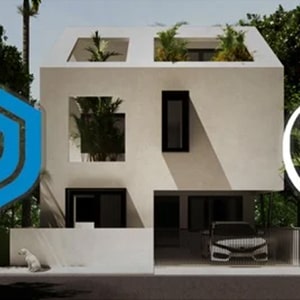
Description
Master SketchUp & V-Ray for Architectural Exterior Design – Complete Beginner to Advanced Course
Requirements
-
A computer (Windows or Mac) capable of running SketchUp, V-Ray, and essential plugins.
-
Strong motivation, willingness to learn, and passion for mastering 3D modeling and photorealistic rendering.
-
No prior experience needed—just your computer and your desire to start learning today.
Course Overview
Welcome to the most comprehensive SketchUp and V-Ray Exterior Design Course for aspiring architects, designers, and 3D artists. This program takes you from beginner to advanced level with step-by-step training, real residential projects, and powerful workflows used in professional architectural visualization.
Whether you want to design your dream home or create high-quality client-ready renders, this course gives you everything you need to master SketchUp, V-Ray, and architectural design fundamentals.
Why Choose This Course?
✔ Complete Architectural Design Training
Master every essential SketchUp tool—from walls and openings to stairs, facades, landscape modeling, and more. Learn real workflows used in architecture firms.
✔ Downloadable Practice Files
Access SketchUp models, project files, and resources for every lecture so you can follow along easily.
✔ Learn from an Experienced Architect
Gain insider techniques, shortcuts, and workflow secrets developed over 10+ years of professional experience.
✔ Monthly New Content
Enjoy continuous updates with new modeling, rendering, and design tutorials added regularly.
✔ Exclusive SketchUp & V-Ray Library (Worth $150+)
Get access to ready-to-use models, materials, and assets tailored for exterior design scenes.
✔ Built for All Skill Levels
Perfect for complete beginners, intermediate SketchUp users, and professionals wanting to upgrade their workflow.
Who Should Enroll?
This course is ideal for:
-
Architects & Architecture Students
-
Interior & Exterior Design Professionals
-
3D Artists & Visualizers
-
Real Estate Agents
-
Construction & Engineering Professionals
-
Agencies & Teams needing standardized training
-
Anyone interested in 3D modeling or photorealistic rendering with SketchUp and V-Ray
-
Beginners who want to go from zero to expert
What You Will Learn
This course is carefully structured into five major sections, ensuring you build solid fundamentals before advancing to complex modeling and rendering techniques.
Before Section 01: Installation & Setup
-
Installing SketchUp, V-Ray, and essential productivity plugins
-
Understanding workspace setup for efficient modeling
Section 01 – SketchUp Fundamentals
-
SketchUp interface and navigation
-
Core modeling tools and essential commands
-
Groups & Components for professional workflow
-
Customizing shortcuts for efficient modeling
-
Creating sections & exporting CAD views
Section 02 – Modeling a Contemporary Residence
Learn to model a complete residential building from scratch:
Architecture Basics
-
Introduction to residential design
-
Understanding Vastu principles
-
Importing CAD drawings into SketchUp
3D Modeling Essentials
-
Modeling walls, openings, slabs, roof structures
-
Creating doors, windows, and balcony railings
-
Modeling dog-legged stairs
-
Designing a parametric glass façade (using Curviloft, Bezier Spline, Joint Push Pull & more)
Landscape & Site Modeling
-
Creating site terrain using Sandbox & Artisan tools
-
Adding vegetation using Laubwerk
-
Modeling surroundings, pathways, and site levels
Camera Setup
-
Creating professional scene views
Section 03 – V-Ray 6 for SketchUp: Photorealistic Rendering
-
Introduction to V-Ray interface and Asset Editor
-
Lighting using the Archgyan Photographic Lighting System
-
Building and rendering a studio scene
-
Applying realistic materials and building your V-Ray library
-
Essential render settings & render elements for post-production
Section 04 – Photoshop Post-Production
Enhance your V-Ray renders with professional post-processing:
-
Importing render elements correctly
-
Adding sky replacements, background trees, and ambient effects
-
Working with brushes, masks, and blending modes
-
Placing human & animal cutouts
-
Adding concrete, road, and wall textures
-
Final color grading using adjustment layers
By the end, you’ll create a polished, photorealistic final render.
Section 05 – Exterior Workshop (NEW)
A complete workshop using V-Ray 5, Skatter 2, and Quixel Megascans:
-
Advanced camera angles & lighting techniques
-
Using Skatter 2 for realistic 3D grass
-
Adding entourage, vehicles, and trees via Chaos Cosmos
-
Integrating high-quality Megascans assets with Transmutr
-
Using SketchUV & TextureMe for accurate texture mapping
-
Applying and editing PBR materials
-
Convert day renders to night renders using Lightmix
Special Features Included
-
Downloadable SketchUp scenes with full V-Ray settings
-
Exclusive SketchUp + V-Ray library for exterior projects
-
Monthly new tutorials and updated course materials
By the End of This Course, You Will Be Able To:
-
Model any residential or exterior project confidently in SketchUp
-
Apply advanced techniques using professional SketchUp plugins
-
Create high-quality photorealistic V-Ray renders
-
Produce polished final visuals using Photoshop
-
Deliver professional architectural visualization work for clients
Please Note: Files will be included in this purchase only Full Course Video & Course Resources. You will get cloud storage download link with life time download access.




Reviews
There are no reviews yet.